
Set up a Wireless Router: connect, configure, settings
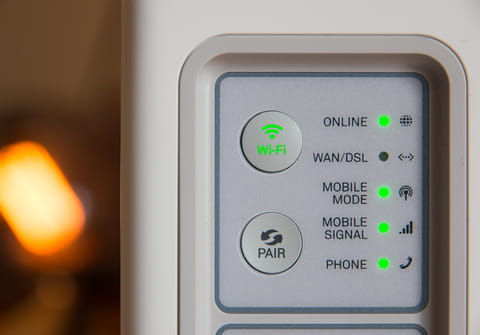
Knowing how to install and configure a router in the best way never hurts. Therefore, here we give you step by step instructions on how to properly connect your router, change Internet and Wi-Fi settings and optimize its performance.
There are many companies that produce routers: TP-Link, Netgear, D-Link, ASUS, Linksys and others. Different routers have almost the same connection algorithm, but the setting may differ depending on the brand and model. We give general advice that should fit most routers available.
How to place and connect a wireless router?
So, you took the router out of the box and thought about where in your apartment or office it is better to put it (the ideal place is in the center of your room and closer to your gadgets). Plug it in and the lights on the router should turn on. Everything is going well!
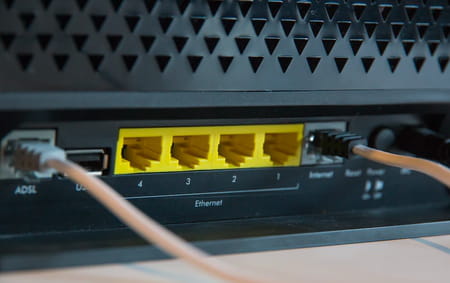
Now find the port labeled "WAN" (or "Internet") on your router. Insert a Ethernet cable from an Internet provider or from an ADSL modem into it.
Now find the network cable that you need to connect the router to your device (usually it comes with the router). On the router, insert it into one of the connectors labeled "LAN" (or "Home Network"), and on the computer into the network card.
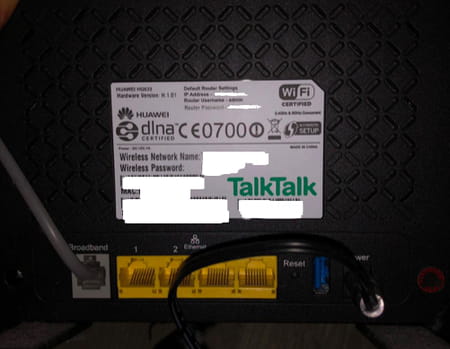
Find the power button and turn on the router. It should immidiatelly start distributing Wi-Fi. If this is a brand new router, the name of the Wi-Fi network should be written on the router case. The Wi-Fi password is also written here.
How to set up a router?
On computer:
- Go to the Wi-Fi Settings on your computer and enable the "Set IP Addresses Automatically" option. Most often it is enabled by default.
- To enter the settings, find the Default Access address of your router, factory username and admin password. This information is located also on the device. On your device that is connected to the router, open a browser and write in the address bar the Default Access address.
- An authorization page will appear with fields for entering a username and password. As we have already said, they are indicated on the body of the device (usually these are admin and admin). There are routers on which you need to come up with and enter your username and password.
On mobile device:
If you have a smartphone or tablet, then you can also easily set up your router using this mobile device.
Go to Settings of your mobile gadget > Wi-Fi and select your network (that is, the network with the name of your router).
Connect to it. If the network asks you to enter a password, press and hold the Reset button on the router for 10-15 seconds. When all of the LED indicators blink, release the button and the router will restart.
Now open a browser on your mobile device and type: 192.168.1.1 (or: 192.168.0.1) in the address bar. Confirm the transition to this address.
Now you can configure router settings.
Сonfiguring Internet connection settings
The easiest way to configure the router is to use the "Quick Setup" wizard. There are several different connection types: Dynamic IP (DHCP), Static IP, PPPoE, L2TP, PPTP. Ask your Internet provider what type of connection it uses. In the case of the most commonly used "Dynamic IP" (DHCP), the Internet should work immediately after connecting to the network. If the connection type is PPPoE, L2TP, PPTP, or Static IP, then you will need to enter a username and password, which you can also get from your Internet provider.
Сonfiguring Wi-Fi settings
We advise you to come up with new Wi-Fi network names and password. You can do this in the menu section, which is usually called "Wi-Fi" (or "Wireless Network", "Wireless"). If you have a dual-band router, then the settings must be set separately for the network at a frequency of 2.4 GHz and 5 GHz.
- In the "Network name" (SSID) field, write the new name of the Wi-Fi network.
- In the "Password" field, create and write down a password to enter your Wi-Fi network. Usually a minimum of 8 characters is required.
- Set the security type: WPA2 - Personal.
- You can also write the name of your city in the "Region" column.
After introducing new settings, do not forget to save them!
How to fix a wireless router that can't connect?
Wireless routers experience bugs for all sorts of reasons. If yours is having trouble connecting to a certain network — like, for example, 192.168.1.1 — this tips may be of help.
To fix a wireless router that won't connect, first try to reset your Wi-Fi router by pressing the Reset button for several seconds, as we explained previously.
Try to connect to the network again. If you can't connect using 192.168.1.1, 192.168.1.0, or 192.168.0.1, open a terminal and run the following command:
ipconfig /flushdns
ipconfig /renew
You may also need to reset your browser. To do this, go to your browser settings and locate the reset option.
Repairing your connections may also help. Right-click the network connection icon on the taskbar, and click Diagnose and Repair.
You should now be able to connect to your chosen network with your wireless router.
Quality of Service (QoS)
QoS (quality of service) is a special feature of routers that analyzes traffic and prioritizes certain service. This feature is especially helpful when you are playing a game or watching a streaming video.
How to find the control of this function? On the configuration page, "Traffic Monitoring" section and there you should find a QoS parameter. Enable it and give priority to the desired service.