
How to take screenshot in Excel: shortcut, sheet, cell

Among its wide array of features, Microsoft Excel allows you to take screenshots of data cells in your spreadsheet so that you can present your information in a way that is cleaner and easier to read. Although these screenshots are saved as static images and will not be updated if information changes, this feature is extremely versatile and can be easily transferred to other Office software (such as Word, PowerPoint, or Outlook) for further use.
How to take screenshots in Excel
- Open your spreadsheet, and select the range of cells or entire sheet that you'd like to copy.
- In the Home tab, click the Paste button. Then, scroll to the As Picture option and select Copy as Picture:
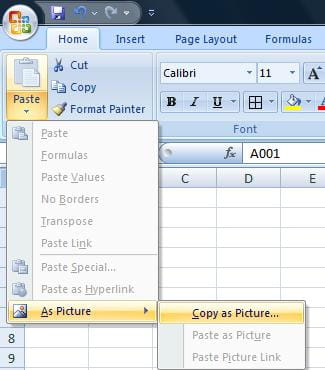
- A small window will open, prompting you to choose the file format in which you'd like the image saved: Picture or Bitmap
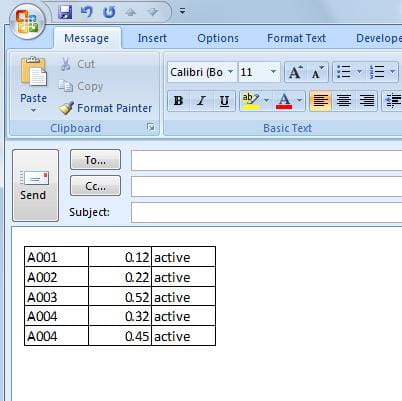
- Make your selection, and then click OK. Your image file will now be available to paste into other applications
Is there a shortcut to take screenshots in Excel?
To quickly take a shortcut you can just use the normal screenshot shortcut on your PC or Mac.
- On Windows this will be the Windows Key + PrtScn, or Alt + PrtScn.
- On Mac this is CMD + Shift + 4.
Need more help with Excel? Check out our forum!
Subject
Replies