
How to fix volume buttons on Asus laptop: Windows 11, 10

The problem with volume buttons and hotkeys on Asus computers is quite common among its users. If the sound system on your PC is not working properly and volume function buttons on your keyboard don't work, read this article to find out how to fix it.
If the volume buttons on your Asus laptop are not working, you can try the following troubleshooting steps to fix the issue:
Restart your laptop
Sometimes a simple restart can resolve temporary software glitches. Restart your Asus laptop and check if the volume buttons start working again.
Check keyboard shortcuts
Many Asus laptops have keyboard shortcuts to control volume. Look for dedicated volume control keys or key combinations on your keyboard, such as Fn+F10, Fn+F11 or Fn+F12. Press these combinations to adjust the volume and see if they work. If you would prefer to update only your hotkeys drivers, check the table below and update only the corresponding drivers (ATKACPI driver and ATK tool for volume buttons fix).

Check for physical damage
Inspect the volume buttons on your Asus laptop for any physical damage or debris that may be preventing them from functioning properly. Clean the buttons gently with a soft cloth and ensure they are not stuck or physically damaged.
Restore system settings
If the above steps didn't resolve the issue, you can try restoring your Asus laptop's system settings to a previous known working state. Use the System Restore feature in Windows to roll back your laptop to an earlier restore point when the volume buttons were functioning correctly. Remember that this will undo any software changes made after the selected restore point.
Run troubleshooters
Windows has built-in troubleshooters that can help identify and fix common issues. To run the audio troubleshooter, do the following:
- Press the Windows key + I to open the Windows Settings.
- Select "System" and then choose "Sound" from the left menu.
- Under the "Related settings" section, click on "Troubleshoot." d. Follow the on-screen instructions to run the audio troubleshooter and apply any recommended fixes.
Update audio drivers
Outdated or corrupted audio drivers can cause issues with volume control. To update the audio drivers on your Asus laptop, follow these steps:
- Press the Windows key + X and select "Device Manager" from the menu that appears.
- In the Device Manager, expand the "Sound, video, and game controllers" category.
- Right-click on the audio device (usually named "Realtek" or "Conexant") and select "Update driver."
- Choose the option to search for updated drivers automatically. Windows will search and install the latest drivers for your audio device. e. Restart your laptop after the driver update is complete and check if the volume buttons work.
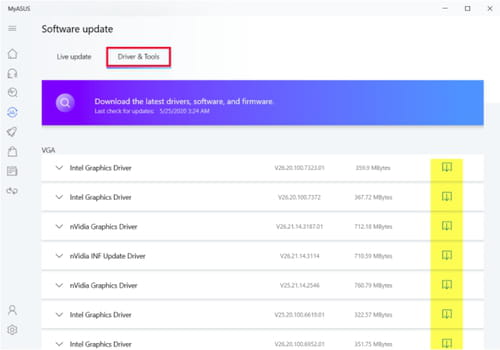
If that doesn't work, try this alternative method of updating your drivers. Go to MyASUS and select Software Update > Live Update. If your system isn't yet updated, it will suggest you do so. If you are already using the latest version, go to Driver & Tools and check for updates there.
If none of these steps resolve the issue with the volume buttons on your Asus laptop, it is recommended to contact Asus customer support or take your laptop to a qualified technician for further assistance.