Facebook Fan Badge: meaning, how to get it

If you have your favourite Facebook page, where you always read posts, often leave comments and likes, you probably already have a Top Fan badge. If so, read on to find out, what a Top Fan badge is and how to manage it.
What is a Facebook Fan Badge?
The Top Fan Badge is a Facebook feature to encourage the loyalty of Facebook users and build a strong community around a brand, cultural institution, media, or any other public page. If someone visits your page a lot and often leaves comments on posts, shares and likes, photos, and videos that you post – this person can become one of your Page’s Top Fans and receive a Top Fan badge.

The badge will be displayed next to your top fans’ names. They will also appear under the community tab of the page as its Top Fans. However, users can choose whether they want to display that they are Top Fans or not.
Brands with a Facebook page and Top Fans feature switched on can analyze the potential audience better, create memorable events, and reward top fans for their devotion. To enable this function, make sure that your page is at least 28 days old, has video page template installed and has more than 10 thousand followers. This way, you can enable the feature and make the most out of it.
How to turn Facebook Top Fan Badges on or off?
To turn Top Fan Badges on or off, go to your Facebook page and click on Settings in the top right corner. Click on the star sign – Facebook Badges and select whether you want to Turn Top Fan Badges on or off.

How to remove a Facebook Top Fan Badge?
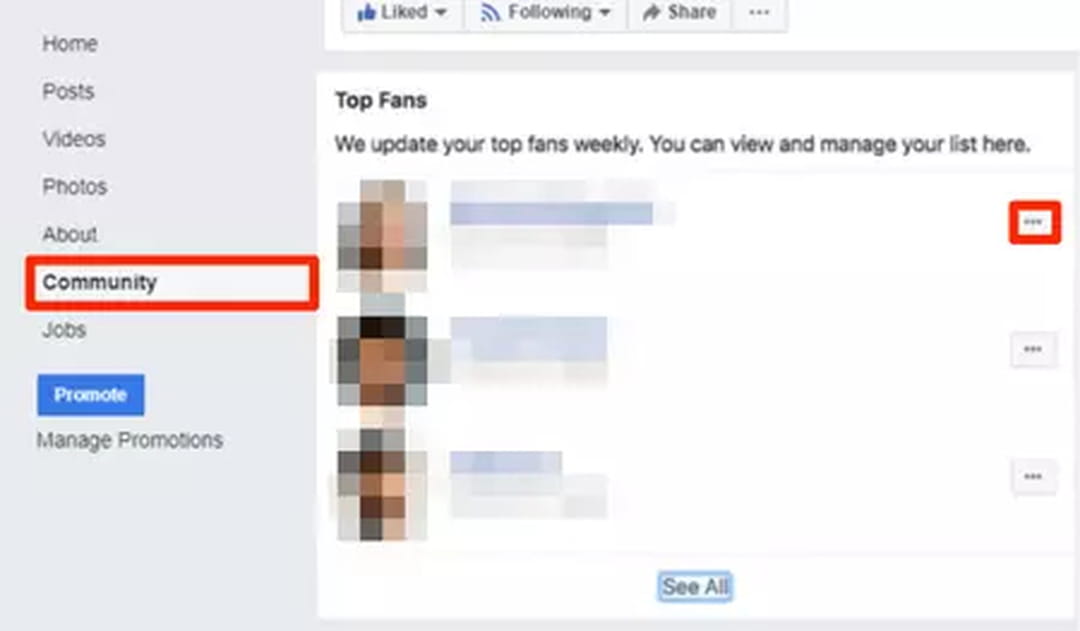
To remove a Top Fan Badge from a user, go to your Facebook page and click on Community on the left side of the screen. Select the person you’d like to remove a top fan badge from and click on the three little dots, then select Remove Top Fan Badge