
How to increase your PC hard disk space?

Have you found that you are running low on hard disk space? In this article we will show you how to increase the cache of your hard disk and improve the performance of your PC.
Why should you increase your hard disk space?
A cache is a temporary area of storage for quick access to frequently accessed data. It is a very efficient tool used in Windows Vista and XP which is set as default under these two operating systems. Reading and writing from the hard drive's cache allows for faster access to some applications.
To increase the cache on the hard disk, the LargeSystemCache registry key has to be updated. A cache memory stores frequently accessed data for quick access. When a file stored on the hard disk is accessed, the OS stores a copy of this file in the cache memory. The next time the file is accessed, the OS retrieves the file from the cache memory thereby reducing the access time greatly. Some changes to the hardware, like RAM, may be required to increase the cache of a hard disk drive. A higher cache memory allocation will require more RAM.
The cache speeds up file loading times because it keeps a copy on the local machine, meaning it does not have to be downloaded again if it is accessed multiple times. Windows will consult the cache before downloading information, and if it already exists there it can save time by using the local copy stored in the machine's RAM.
How to increase the cache on the hard disk?
Due to higher cache memory allocation, it is recommended to have more than 256MB of RAM for better efficiency. It is highly recommended to save your registry before any configuration.
-
First, click on Start and select Run.
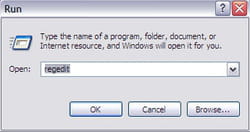
- Type regedit in the new window:
- Detect the below command:
HKEY_LOCAL_MACHINE\SYSTEM\CurrentControlSet\Control\Session Manager\Memory Management
- Then change the LargeSystemCache DWORD from 0 to 1.