
Create a Skype account: with work mail, Gmail

Skype is a useful program to call friends and colleagues, organize video conferences, chat and share files. To be able to use it, you need to be registered on Skype and have the application installed. In this article, we will talk you through the process of how to create an account on Skype, download and install the app, set the preferences and make the most out of the program.
How to download and install Skype?
To start using Skype you need to download and install it first. You can download it here for Windows, Linux, Mac, Android, iPhone ,iPad.
Once Skype has been downloaded, launch the installation process by double-clicking on the software folder. When it is done, you can open the app.
How to create a Skype account?
If you have never registered for Skype, you will need to create an account. Open the app and click on No account? Create one!
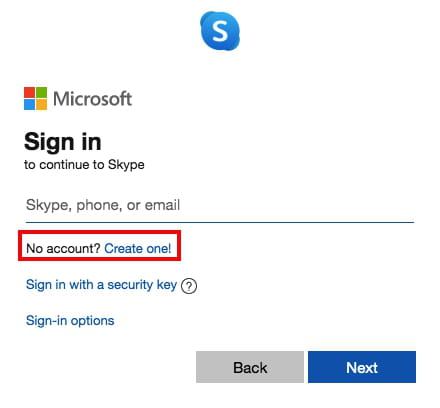
Then follow the procedure: type your phone number, create a password, write your name and surname and select your birth date.
After that, you will receive a confirmation code to your telephone number: type it in the corresponding field and click Next.
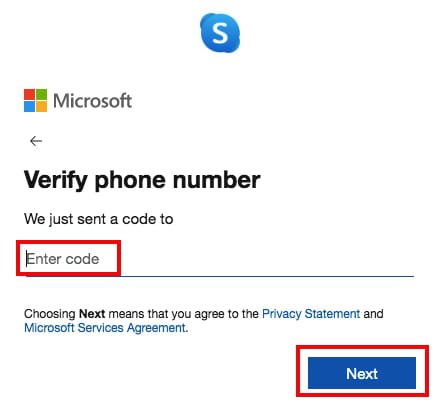
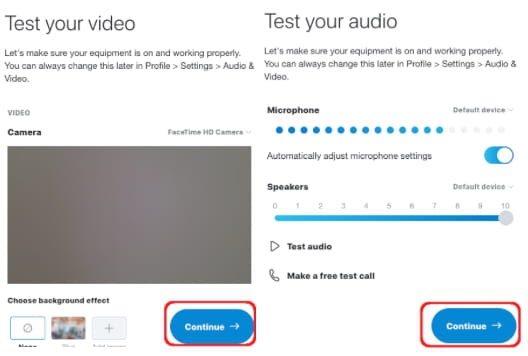
Congratulations! Your Skype account has been created. You will now need to upload your profile picture and test your microphone and camera. You can also skip these steps and do them later if you want. If you are registering with a mobile phone or a tablet, follow the same procedure.
How to add Skype primary email address?
- To change the primary email address associated with your Skype account, follow this procedure.
- Sign-in on Skype and click on your profile picture in the top-left corner of the app. Scroll down to Settings and select Your profile in the right pane.

- You will be automatically redirected to Skype on the web. In Contact details change or add your email address and press Save.
- You can add multiple email addresses to your Skype account to help your friends and colleagues find you. If you do so, you can set one primary email address to which your account will be linked. Don’t forget to click Save before leaving the page to apply changes.

How to sign in automatically?
- Setting automatic Sign-in in Skype can vary depending on your platform.
- On Windows and Linux Skype launches automatically by default settings every time you start using your computer. If not, you can set it up. Go to Menu > Startup and Close and checkmark Automatically start Skype.
- On Mac go to Settings > General and enable the tab On close, keep Skype running to make the app run even if you closed the Skype window. Next, click on the Skype icon > Options > Open at login to automatically log into your account.
- On Android devices open the app, go to Settings > General, and checkmark Sign-in Automatically.

- For iPhone and iPad there is no such feature as automatic sign-in, because once you log in you stay signed in. If you’d like to stop the session and sign out, open the Skype app, tap on your profile picture and choose Sign Out in the top-right corner.
How to add a second Skype account?
You can own two Skype accounts for personal purposes and business meetings, for example. To do so, sign out of your account and create a new account following the procedure above. Make sure you are using a different email or phone number, otherwise, the system will notify you that this user is already registered.
Although you can not run two accounts on the same device at the same time, you can sign in to one of your accounts from your computer, and the other one from a mobile phone or a tablet.
The other way is to log in to Skype for web using your desktop version or mobile application at the same time.