
Free Download Manager: maximize simultaneous downloads

The Free Download Manager application allows users to set a limit on the number of simultaneous downloads that can take place at one time. This article will explain how to set your download limit in the software.
How to maximize download limits in Free Download Manager?
-
Launch Free Download Manager and click on the Options tab > Settings:
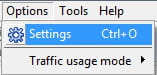
- Next, go to Downloads > Downloads. From here, you should select the traffic usage mode of your choice.
- In the section labeled Maximum number of running downloads, select the Set to option.
- In the area labeled corresponding the the number of downloads, enter how many downloads you'd like to allow at one time:

You may repeat this process for other traffic usage modes.
- Save your settings by clicking on OK.
Any more download questions? Check out our forum!
Subject
Replies
SKU011.CAB
159