
Change language on Outlook: app, web

Microsoft Outlook is available in several languages and allows you to easily and seamlessly switch between the languages of your choice. This quick tutorial will show you how to change your language settings in Outlook web as well as on the Outlook app.
How to change the language settings on Outlook web?
By default, the application will run in the language setting of your computer, but you can change these settings to your liking in just a few simple steps.
- From your Outlook.com home screen, go to Settings > More mail settings.
- Next, go to Customizing Outlook > Language.
- Select the language of your choice from the list and then click Save to apply your settings:
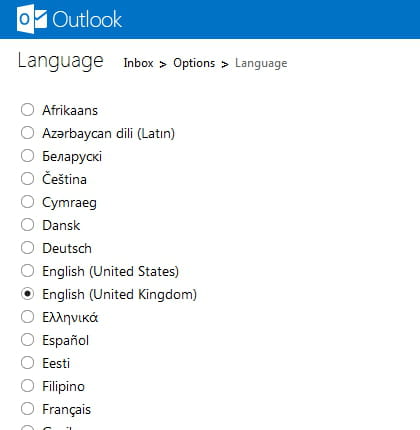
How to change the language on the Outlook app for iPhone?
You can change the language for any app on iOS devices. Here's how:
- Go to Settings > General > Language & Region.
- Tap Other Languages and add a language you want to use.
- Head to the main Settings screen and select the Outlook app.
- You will see a Preferred language tab. Tap on Language under it.
- Select the language you'd like to use. And it's done!
How to change the language on the Outlook app for Android?
On Android devices, Outlook automatically uses the language that your device is set to. To change the language of your device, follow these steps:
- Go to Device Settings > Language and Input.
- Select the language and click OK to save the changes.
Do you need more help with Outlook? Check out our forum!
Subject
Replies