
Find and change iTunes backup location: on Windows, Mac

Sometimes your computer's operating system might bug and slow down because it is running out of storage space. It often happens to users who have large backup files, such as iTunes backups, stored on the hard disc. You can set up your computer that iTunes backs up to an additional hard drive or anywhere else. In this article, we will show you, how to find your iTunes backup and change its location.
How to find iTunes backup files on Windows?
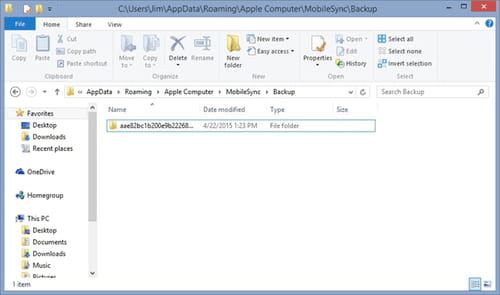
Both Mac and Windows store iTunes backup in the Backup folder. However, the location of the Backup folder depends on your operating system. To find your iTunes backups on Windows, go to:
- \Users (username)\AppDat/a\Roaming\Apple Computer\MobileSync\Backup\
- Or<bold>open the <bold>Search bar and write %appdata% o
- Or %USERPROFILE% (if you downloaded iTunes from the Microsoft Store).
Press Run and open Apple (or Apple Computer) folder, then choose MobileSync > Backup and you will see all your backup folders.
How to find iTunes backup files on Mac?
- In iTunes, choose Preferences and go to Devices.
- From here, you can right-click on the backup that you want, then choose Show in Finder.
- Another option is to open Finder, then press command+shift+G and type the link to your backup folder ~/Library/Application Support/MobileSync/Backup/.
- Click Go and you will see all your backup folders.
Note: Be careful and don’t delete or relocate separate files from the backup folder, because it might ruin them.
How to change iTunes backup location?
To change the backup location you can install software or try and do it manually.
Using software
The easiest way to change your iTunes backup location is to do it through free software. You can download CopyTrans Shelbee or try iPhone Backup Extractor and follow its simple instructions.
Manually
- For Windows
Open the Backup folder following the procedure above. Then, move the folder to the desired destination by dragging and dropping it. When the folder is successfully copied, press the SHIFT, right-click and select Open command window here (for Windows 10 Open select Powershell window here).
In the new prompt window, type in the following command mklink /d Backup "[desired-new-backup-path]", in the place of [desired-new-backup-path] type the neew folder’s name and press Enter. Restart your computer to apply the changes.
- For Mac
1) Open Finder and type Terminal app which is automatically pre-installed on your Mac for different commands. Launch the app by double-clicking on its icon.
2) Write this code to enable Backup folder changes: cd ~ / Library / Application \ Support / MobileSync and press Enter. To open the folder type Open in Terminal and press Enter. Finder will now show you your Backup folder.
cd ~ / Library / Application \ Support / MobileSync
3) To change the location of the backup folder, this folder has to be renamed, moved, or deleted. For example, you can rename it to Backup (old). After the Backup folder has been renamed, moved or deleted, you can create a link to the desired backup location. Use the following command:
ln -s [desired-new-backup-path] ~ / Library / Application \ Support / MobileSync / Backup.
4) In the place of [desired-new-backup-path] place the name of the folder where you’d like to keep your backups.
cd ~ / Library / Application / Support / MobileSync1n -s [desktop] ~ / Library / Application \ Support / MobileSync / Backup
5) Then, press Enter, and the change will be completed. Restart your Mac and from now on iTunes will save its backups in a new location.