
How to enable touchpad: Windows 10, on laptop
The Touchpad can sometimes be accidentally disabled on your laptop, or you may disable it because it's overly responsive. If you would like to switch it back on or shut it off, this tutorial will walk you through the necessary steps.
What is a touchpad?
A touchpad, or a trackpad, is the element that has replaced the traditional computer mouse. They are most often found on laptop computers which, for comfort and practicality's sake, are often sold without mice.
How does a touchpad work?
Touchpads use relative motion to work, meaning that they enable you to swipe your finger across the touchpad and have the pointer onscreen mimic your gesture. Depending on your device, you may have the option to configure your touchpad to be more or less responsive and to react in certain ways to certain gestures.
Most touchpads are in the shape of a large square, with two buttons on the bottom to perform left- and right-clicks. In the absence of these buttons, a trackpad will give you the option to click by tapping its surface with one, two, or even three fingers to perform different types of clicks.
When should you activate or deactivate your touchpad?
If you use a USB mouse, you will not need your trackpad and may even find that it is a nuisance to maintain activated. In this case, it is recommended that you deactivate it in your computer's settings. Inversely, if you have decided to stop using an external mouse, you will find it useful to reactivate your touchpad.
How to turn on/off the touchpad on a laptop?
To reactivate your touchpad, first try restarting your PC.
If that doesn't help, go to Control Panel > Mouse > Settings > Enable (or Disable to disable):
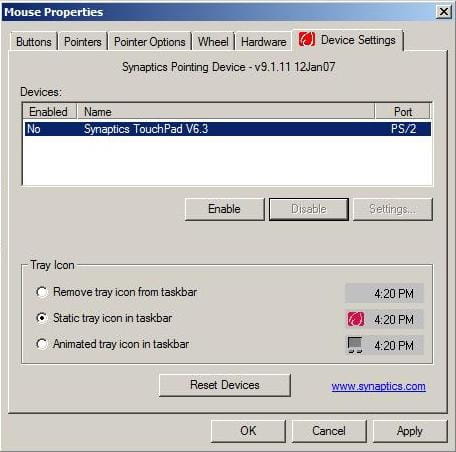
N.B. On some models, there is a keyboard shortcut to activate or deactivate the touchpad. For example, on an ACER machine, press FN + F7. Some newer laptops include a dedicated button to perform this manoeuvre.
How to deactivate your touchpad when a USB mouse is connected?
You may find that it is sometimes easier to plug in and use a USB mouse to perform your tasks than it would be with a touchpad. If you do this often enough, you might find it interesting to program your computer to recognize the mouse when plugged in and automatically deactivate your touchpad.
For Windows 10
Click Settings > the Devices icon > Mouse & touchpad.
Under the Touchpad section, uncheck the option next to Leave touchpad on when a mouse is connected.
Windows 7, and Windows 8/8.1
Open Control Panel, locate the entry named Mouse, and click it to open Mouse Properties.
Head to the ELAN or Device Settings tab, and check the option titled Disable when external USB pointing device plug in or Disable internal pointing device when external USB pointing device is attached. Finish by clicking Apply.
How to disable and enable a Mac trackpad?
To disable gestures on your Apple laptop's trackpad, head to System Preferences > Trackpad and check or uncheck the options based on your preferred clicking experience:
